Using the Codex App
Once the shim and exports are installed and the adapter is built:
- In Codex App, add a Remote connection to the host (or
localhost). The app runs its native SSH probe and bootstrap; the shim routescodex app-serverinto the adapter. - Start a thread and send a prompt. Claude Code runs the turn:
- Agent text and reasoning stream into the conversation.
Bashcalls surface as Codex command approvals.Edit/Write/MultiEditsurface as file-change approvals with a live diff that grows while Claude writes it.- Files Claude reads, searches and lists fold into Explored rows; see How tool calls show.
- Other tools surface as command approvals naming the tool and what it touches, and MCP tools as the App's MCP tool approval card.
- Approve actions in the Codex App UI as usual (see Approvals).
- Disconnecting closes the proxy. Once no turn is active, the daemon idles out and the in-process Claude runtime is reclaimed.
Picking a model
Codex App's model menu stays a model selector only — pick Claude Sonnet, Claude Opus, Claude Fable, Claude Haiku, etc. The active Claude Code route (which backend serves the turn) is chosen outside the App with the shim mode; see Backends.
The default picker exposes Claude Code aliases; model availability and the version an alias selects depend on your account, provider, and Claude Code version. The list is not an account entitlement check. CLAUDE_CODEX_MODELS replaces the default Claude list when you need to customize it. With model process profiles, the Claude list is the profiles, each running its own Claude Code; a chat then keeps its profile once it has a conversation, and picking another one asks for a new chat. A chat whose profile changed or went away, or one from before profiles were set up, still opens to be read, but sending it a message asks for a new chat.
Each Claude model offers the reasoning efforts Claude Code reports for it: Max on the models that take it, and no effort levels on Claude Haiku. Claude Code reports them on the first Claude turn, and the App picks them up the next time it reloads the model list, which it does when its window regains focus, at most every five minutes. Until then every model offers Low to Extra High. The App shows Max only after you turn it on under Settings > Agent > Model features > Available reasoning efforts. See Models & effort.
Claude Opus Plan / Sonnet Execute keeps the opus-plan option ID and maps to Claude Code's opusplan hybrid mode: Opus during planning, Sonnet during execution. Selecting it does not itself enable plan mode (see Plan mode), so an ordinary conversation may correctly run on Sonnet. Choose Claude Opus to use Opus throughout. See the Claude Code model configuration.
A new chat runs on whichever model is picked before its first message. After that it stays on that model's backend, since its conversation lives in a Claude session or a Codex one and neither carries over. Picking a Codex model in a Claude chat, or a Claude model in a Codex chat (unless the codex-proxy route carries every chat), is refused: the App reports that it couldn't update the model settings and the chat keeps its model. Pick another model from the same family, or start a new chat for the other one. With CLAUDE_CODEX_DISABLE_CODEX_PROXY=1 the menu lists no Codex models and a new chat on one is refused, while the App's own title and summary requests run on the Claude summary model.
Thinking and reasoning summaries
With the default native Claude Agent SDK backend, Claude's thinking shows above its reply the way Codex shows a reasoning summary, while it streams and after the chat is reopened. The adapter asks the Claude CLI for summarized thinking (--thinking-display summarized), since recent models otherwise return their thinking redacted, and streams each run of thinking into the reasoning item's summary, the only part of it the App renders. Title and compaction turns do not ask for it.
Thinking the adapter stored before it did this, as raw reasoning content, shows as the summary when history is read.
To keep the thinking out of the conversation, set Settings > Agent > Configuration > Reasoning summary to None (model_reasoning_summary = "none") or start the adapter with CLAUDE_CODEX_REASONING_VISIBLE=0. The setting applies from the next turn. The thinking is then kept as raw reasoning content, which the App does not show, and the CLI is not passed the flag; use the variable as well with a Claude CLI pinned through CLAUDE_CODEX_CLI that predates the flag. Whether a model or provider returns summarized thinking at all is up to them; when it returns none, nothing shows.
Retries and errors
When the Claude API is overloaded or unreachable, the Claude CLI retries the request on its own. With the default native backend, each retry shows in the turn as Codex shows a stream retry: a passing Reconnecting 1/10 row that counts up and leaves once Claude answers, with the HTTP status and the wait under it. Like Codex, the adapter does not store these rows, so they are gone when the chat is reopened. A foreground subagent's retries show the same way in the subagent's own thread while it runs, never in the parent chat; Claude Code does not report a background agent's retries.
A turn that fails tells the App why, with the error code Codex would send: the context window is full, the server is busy (HTTP 529), a rate limit, a bad request, a server error, or a failed connection; anything else is a plain error. An overloaded API shows as Server is busy. The adapter never sends the codes the App answers with ChatGPT account flows, so a Claude authentication or billing failure shows its message instead of a ChatGPT plan upgrade or sign-in prompt.
When the Claude CLI refuses to start a session, the turn fails with a message the adapter writes for the reason Claude Code gave, saying what fixes it, and the reason's name under it (for example Claude Code startup failure: org_config_refused). A failure a retry can fix, such as organization settings that could not be loaded, is a failed connection, which the App offers to retry. A refused sign-in, a provider or account the organization does not allow, invalid managed settings or a problem on this machine (a broken proxy setting, a missing working directory, an outdated CLI) is a plain error. The CLI's own output is never shown, since it can contain a proxy URL with its credentials. The adapter asks the CLI to report every startup failure this way by setting CLAUDE_CODE_STARTUP_FAILURE_RESULTS=1; a value in the adapter's environment takes its place.
Sleep
Most failed connections on a laptop come from the computer going to sleep during a turn, which breaks Claude's connection to the model. When a turn fails after the computer slept for a minute or more since Claude last made progress in it, its error says so: roughly how long the computer slept, and that a message, or Continue, picks up where Claude left off. A sleep the turn went on from (Claude, or a subagent, wrote or ran something after waking; retries, heartbeats and an agent that failed on its own request do not count) is not blamed, and neither is an API that answered, for example as overloaded or over a limit. On macOS it also points to the App's Settings > General > Prevent sleep while running, which does not stop sleep with the lid closed (the App does not offer it on Windows). The error keeps its code and details.
To have the adapter keep a Mac awake itself while Claude works, start it with CLAUDE_CODEX_PREVENT_IDLE_SLEEP=1: it then holds caffeinate -i while any turn, background agent or other background work runs, and lets go once nothing does. A command Claude runs in the background with Bash counts as background work, so a dev server or file watcher keeps the Mac awake until its Claude session closes, CLAUDE_CODEX_BACKGROUND_IDLE_MS (default 2 hours) after the session's last message. Closing the lid still sleeps. It is off by default and does nothing on other platforms.
A turn waiting on a subagent or workflow does not fail because the computer slept, or while it waits on you for an approval, an answer, an MCP form or an App tool call: the CLAUDE_CODEX_SUBAGENT_TIMEOUT_MS wait starts over after either.
Notices
Notices the Claude CLI would show an interactive user at once show as a dim row under the turn, which goes on: a compaction Claude Code could not do, a switch to a fallback model, an urgent CLI notification, or a call refused while no turn was running. Each message shows once a turn, and a turn shows at most five. The App does not keep these rows when the chat is reopened. A turn that then fails repeats its notices in its error's details, which are stored with the turn and returned by thread/read, but the App shows those details only in an error diagnostics view it does not always offer.
The adapter sends each notice as an error notification with willRetry and no error code, which the App draws as such a row without failing the turn, and also as a warning, as Codex does, for other clients (the App opts out of warning notifications in initialize). CLAUDE_CODEX_NOTICE_ROWS=0 sends the warning alone. Title and other helper turns send warnings only.
Calls between turns
A background agent, a workflow or a cron job can call a tool that needs your approval, ask for your input through an MCP server, or call an App tool after your turn has ended. With no turn running there is nowhere to ask, so the request is turned down, as before, but not silently. A tool call or an App tool call is refused, and Claude is told no user turn was active and that you can run it again in a turn. An MCP server's request for your input is declined: the server gets only a plain decline, so what Claude hears of it is up to that server. In every case a notice row under the chat's running or last turn says what was turned down. Nothing is queued; ask Claude to run it again in a new message.
Request errors
A request you can put right, such as a model the chat cannot take, an unknown chat or a bad parameter, fails with the JSON-RPC code -32600 (invalid request), as Codex answers an unknown chat, and its message says why. Picking a Codex model in a Claude chat that has a reply, for example, shows the Couldn't update model settings toast with the reason (below the App's own "Check your config.toml." line, which the App adds to every such error), and the menu goes back to the Claude model. A failure inside the adapter stays a server error (-32000).
The context gauge
The composer's context gauge shows how full Claude's context window is: the size of Claude's latest request against the window of the chat's model. It moves while a turn runs, after each request Claude makes, as it does for Codex chats. Claude reports the window only when a turn ends, so in a chat's first turn after the adapter starts, the gauge appears once that turn ends, unless another chat on the same model has finished a turn since. Subagents' tokens count towards the chat's total but leave the gauge alone.
Branches in the sidebar
A chat whose folder is a git repository shows its branch in the sidebar, as Codex chats do. The adapter looks up the commit, the branch and the origin remote, without any credentials in its URL, when the chat starts and again when each turn ends, so the label follows a branch Claude switches to or creates. Listing chats never runs git; switching branches by hand shows after the chat's next turn. Chats from before this version get their branch when they are next opened.
Forks and rewinds
A forked chat shows the conversation it was forked with, then its own messages, as a Codex fork does: when it opens, after the adapter restarts, when the App pages its history and in Find. Like Codex, the adapter keeps a copy of those turns with the fork, under the same turn and item ids, so rewinding or deleting the original chat leaves the fork as it was. Forking a fork carries the whole conversation along, and forking from one of its earlier messages works on the inherited ones too. Claude's context follows the same cut: the fork remembers what it shows and nothing after it.
Rewinding a fork (editing an earlier message, or Fork from here on a message before the fork point) can reach back into the inherited conversation: those turns go from the fork only, and Claude resumes after the newest one left, or in a new session when none is left.
Forks made by an earlier adapter version showed only their own messages. Such a fork gets its inherited conversation the first time it is opened, when the adapter can tell exactly where it branched off; when it cannot (the original chat was rewound past that point or deleted, or its turns predate Claude checkpoints) the fork keeps showing only its own messages. Side chats and the other temporary forks the App makes are not kept, as in Codex.
How tool calls show
Claude's tool calls show as the items Codex uses for its own:
- Exploring files. Claude's Read, Grep, Glob and LS calls show as commands named after the tool, such as
Read src/app.tsorGrep TODO in src, and fold into an Explored row with the files read and the searches and lists run. A Bash command that only reads, searches or lists files, such ascat,sed -n,rg,findorls, folds in the same way: the adapter parses it as Codex parses its own commands, followingcdand skipping helpers such as| head -n 20. Anything else, including redirects, variables and globs, shows as the plain command. So does a command that can write files or start other programs, such asfind -delete,| xargs rmor| tee out.txt, even where Codex would fold it. The App keeps the first 30,000 characters of a file or search result; Claude gets all of it. - Images. A Read of an image file shows the image. If the Read fails, or the turn stops before it ends, it shows as the failed Read instead.
- The web. WebSearch shows as a web search, and WebFetch as opening the page it fetches.
- MCP tools show under their server's name. A server whose name contains
__is named right when the turn's MCP configuration lists it. - Other Claude Code tools show as tool calls of a
claude-codeserver.
When Claude Code asks before a Read, Grep, Glob or LS call, for a file outside the workspace for example, the App asks on the command card with the command the item shows. The card names a command's reads and searches only when one of them is the whole command, so it always shows everything that runs. See Approvals for what the card's choices cover.
Chats from before this version keep showing their earlier items.
Plan mode
/plan and the composer's Plan toggle work in Claude chats as they do in Codex chats. A turn sent in Plan mode runs in Claude Code's plan mode: Claude explores read-only, may ask you questions, and hands its finished plan over, which the App shows as a plan card. When the turn ends the App asks Implement this plan?: accepting switches the chat back to Default and sends the plan as a new turn, in which Claude carries it out; writing feedback instead keeps Plan mode on for a revised plan. In Plan mode a tool call that would need your approval (a command, an edit) is refused rather than asked about.
A chat keeps its mode after a restart. A fork starts in Default, as a Codex fork does; when you fork a chat from the App, the App keeps the mode it showed and sends it with the fork's messages.
Approvals
Outside Full access, Claude asks before it runs a command, edits a file, or uses another tool its permission mode does not already allow, and the App shows the approval card a Codex chat would:
- Commands (
Bash) and other Claude tools ask as command approvals. A tool that is not a shell command shows its name and what it touches, such asWebFetch https://example.com. The card carries Claude's reason for asking when it gives one. - Edits (
Edit,Write,MultiEdit) ask as file-change approvals with the diff. - MCP tools ask with the App's MCP tool approval card: "Allow the server MCP server to run tool name?", with the call's arguments.
Allow for this session approves the same command, the same tool call, or for an MCP tool every call of that tool, for the rest of the thread while the adapter runs. For an edit it approves only that edit. With CLAUDE_CODEX_SESSION_SUGGESTIONS=1 it also adds what Claude Code offers for the session with the call, such as a rule for every fetch from the same domain or the folder outside the workspace that the call reads or writes in; that can cover more than a Codex session approval does, so it is off by default. It never switches the thread's permission mode, and it saves nothing.
Claude Code sometimes offers to remember an approval: the "don't ask again" choice of its own prompt. The card then offers to save a rule:
- Allow similar commands, on a command card, appears when Claude offers a single rule for a shell command. The card shows the command prefix that the rule covers, such as
npm testforBash(npm test *). - Always allow, on an MCP tool card, saves a rule for that tool of that server,
mcp__<server>__<tool>. Claude Code matches a rule's server name exactly, so the rule covers no other server whose name starts the same way.
Claude Code writes the rule itself, always to the project's uncommitted .claude/settings.local.json. It never writes to your user settings or to the checked-in .claude/settings.json. From then on, calls the rule covers run without asking, in this chat and in later ones. To be asked again, remove the rule from that file. Nothing is saved unless you pick one of these two choices: Allow and Allow for this session save nothing. A card offers neither choice for a compound command line, for a call Claude offers no "always allow" for, or for a call that only you may answer.
Decline refuses the call: its card shows as declined, and Claude is told and goes on. Cancel refuses it and stops the turn, as the Stop button does. A call Claude refuses on its own (a deny rule, its permission mode) also shows as declined, with a notice row saying why.
Auto-review
Picking the App's auto-review permissions preset in a Claude chat runs the chat in Claude Code's auto permission mode, where a classifier decides the calls that would otherwise ask you. The chat keeps the choice for its later messages, after a restart and in its forks, until you pick another preset. A call the classifier blocks shows as declined with a review card giving its reason, and Claude is told and goes on; the card's "approve anyway" has nothing to override in a Claude chat.
Auto mode needs a model that supports it, a sandbox that allows writes and a Claude Code that accepts it. Where it is unavailable (a model without it, a read-only sandbox, CLAUDE_CODEX_PERMISSION_MODE set to another mode), the chat keeps asking you as before: the picker goes back to the default and a warning under Settings > Agent > Configuration says why. Plan mode and Full access work as they did. Some calls Claude Code says only you may answer ask you in every mode, Full access included, and "Allow for this session" covers only that call.
Skills and the App's tools
Skills you pick with $ or / in the composer work as they do in Codex chats. Claude Code's built-in commands (/simplify, /code-review, …) run as slash commands. For any other skill, the adapter adds its SKILL.md to what Claude reads for that message, so Claude follows it without first looking for the file. That covers the skills in your Claude Code and project .claude/skills folders and the App's own skills Claude can run, up to 64 KiB per skill; Claude reads any other skill file itself. Your message shows only the chip.
The / popup also lists the commands Claude Code finds for a folder beyond its own: your and the project's .claude/commands, the commands and skills of your Claude Code plugins (plugin:name) and the prompts of MCP servers. They show as "Local file" skills and run as slash commands, with the rest of your message as their arguments. A command's "Local file" is a short page the adapter writes for that folder with the description Claude Code reported there, so two projects with a /deploy of their own each show theirs; it is removed when the folder stops reporting the command. Claude Code reports them when a chat's turn starts, so a folder no Claude chat has worked in yet lists them after its first turn, and a command added later appears once the next turn starts in that folder. A Claude CLI started with its setting sources turned off (see CLAUDE_CODEX_CLAUDE_CONFIG_DIR in Configuration) finds no user, project or plugin commands, so none are listed. Commands named like one of the App's own are left out: /init, /compact, /review-mode and the rest, including the ones the App offers only in some windows or chats (/pin, /archive, /read-aloud, /hotkey-window-new, …). Claude Code's plain built-ins such as /cost are not listed.
A message that starts with a command, typed or picked, runs it with the rest of the message as its arguments, a file you mention included (as @path). That includes a command named with a dot, such as /release.notes from a file release.notes.md. Images, a skill you pick with it, a side chat's instructions and context the App sends along reach Claude with the command, ahead of it, and stay out of its arguments. A command you send while Claude is still working is not folded into the running answer the way other messages are: Claude Code runs it once that answer ends, and the turn ends after it.
That is on the default Agent SDK backend. The claude-p, agent-http and agentapi backends (see Backends) get a message as one flat text, with that context ahead of the command, so a command sent with any of it does not run there: Claude reads the whole text as a plain message. Only a message with no such context goes as typed. The context cannot follow the command instead, as it would become the command's arguments. Codex chats on the codex-proxy route get the same flat text, and have no Claude Code commands to run.
Context the App attaches to a message without showing it, such as the follow-up after you connect a suggested plugin, reaches Claude after the message (before it for a command), marked as data rather than instructions when the App does not vouch for it.
The App's instructions to the model describe tools only Codex chats have: starting and messaging other threads, worktrees, automations and the sidebar. Claude chats are told which of these they lack, so instead of searching for them Claude asks you to use the App for such steps.
Inline visualizations
With the default native Claude Agent SDK backend, Claude can answer with a chart, a diagram or a small interactive explainer that the Codex App renders inside the conversation, the same way it does for Codex. Ask for one ("show this as a chart", "draw the flow") or let Claude offer one where it helps.
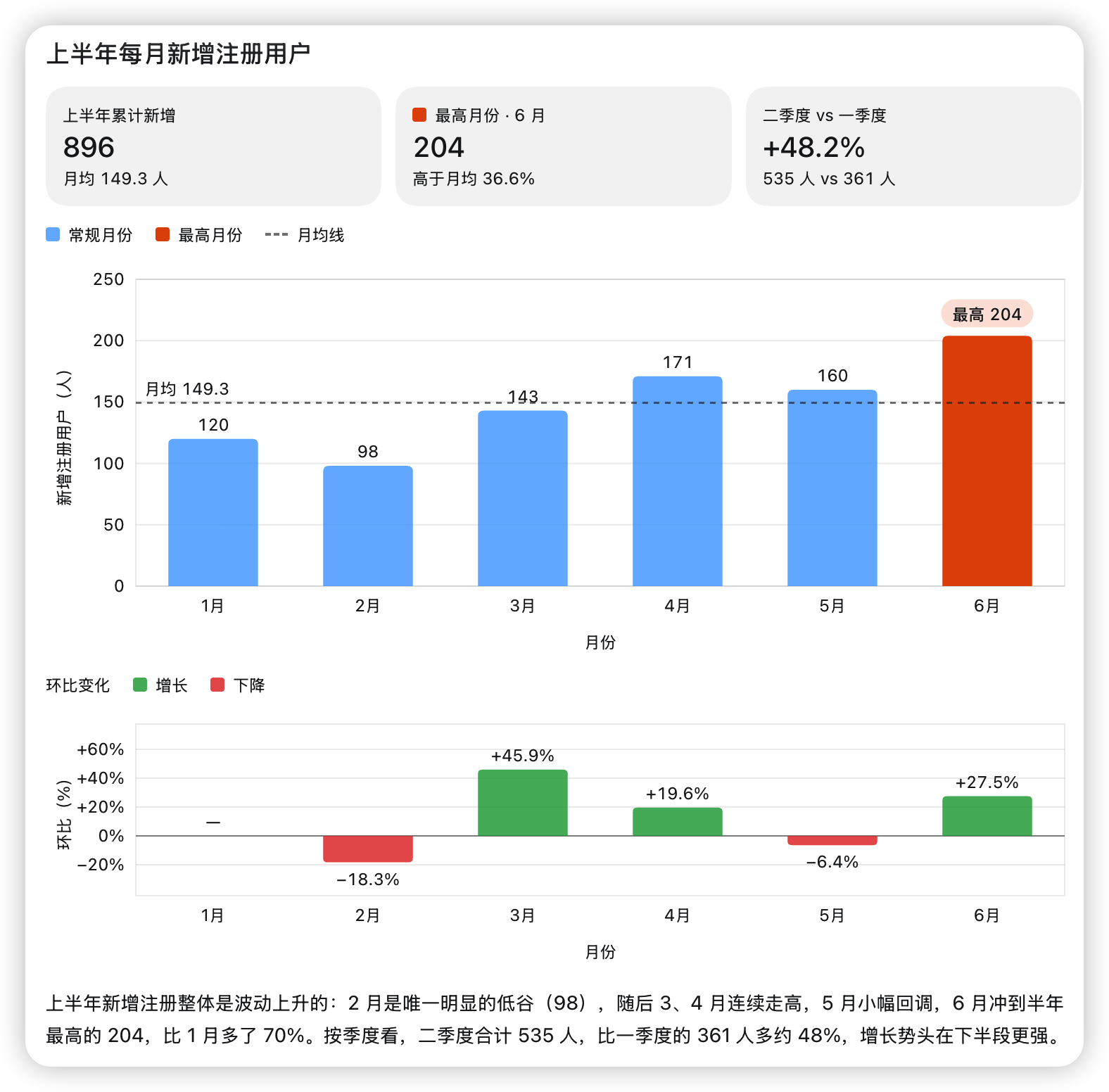
Asked for six months of signups as a bar chart, with the highest month highlighted and the trend summed up below. The request was in Chinese, so are the labels.
How Claude finds the skill. Each time it starts, the App installs its bundled plugins with plugin/install. The adapter remembers the visualize plugin (in config.json under its state folder, so it survives restarts) and lists the plugin's skill in the system prompt of each Claude thread, by name, description and SKILL.md path, together with the line the App renders and the thread's visualization folder. When a request calls for a visualization, Claude reads the skill with its Read tool and follows it. Reads inside the skill's folder and the thread's visualization folder need no approval; writes follow the thread's approval policy as usual.
What renders. Claude writes an HTML fragment to a file and puts a line of its own in its final reply, outside any code fence:
::codex-inline-vis{path="/absolute/path/to/sales-by-region.html"}The App loads the fragment into its visualization sandbox, styled with its theme. Claude adds mode="wide" to the line where the skill asks for a wide layout.
The skill also shows a second form of the line, visualize{"path":"…"} between invisible marks. When Claude writes that line without the marks, the App would show it as text, so the adapter adds them once the message completes and when history is read: the line renders at the end of the reply and after the chat is reopened. While the reply streams it shows as written, and a line inside a code fence is left alone.
New chats only. The App finds a thread's visualizations through the creation date in its id, and reads them only for UUIDv7 ids, which is what Codex issues. The adapter issues UUIDv7 ids for new threads, forks and subagents. Chats it created before that keep working but cannot render inline visualizations, so Claude is not offered the skill there; start a new chat to use it.
File rules. The App reads a fragment only when:
- its file name matches
^[a-z0-9]+(-[a-z0-9]+)*\.html$, such assales-by-region.html; - its path is absolute and lies inside the thread's visualization folder,
<CODEX_HOME>/visualizations/<YYYY>/<MM>/<DD>/<thread id>/(CODEX_HOMEdefaults to~/.codex; the date is the thread's creation date in UTC), inside the thread's workspace or writable roots, or in/tmpwhere the thread's sandbox allows it, with no symlink on the way; - it is at most 5,000,000 bytes.
The prompt asks Claude to save fragments in the thread's visualization folder, which meets the location rule. A fragment that breaks a rule does not render.
File changes while Claude writes them
With the default native Claude Agent SDK backend, a file change shows up before Claude has finished writing it. The card of an Edit, Write or MultiEdit call opens as soon as the input Claude streams names the file, and grows about twice a second while Claude writes the rest, the way the Codex App draws a patch Codex is still writing. How smoothly it grows depends on how the API in use streams a tool's input; one that sends the input at once shows the card when the call is complete.
Once the call is complete, the card holds the finished change, and so does the approval when the thread asks for one. When a response breaks off in the middle of a call and Claude asks again, the unfinished card shows as failed and the new call gets a card of its own. Set CLAUDE_CODEX_LIVE_FILE_CHANGES=0 to show a change only once Claude has written the whole call.
Pull Requests panel
The App's Pull Requests panel is drawn by its bundled code-review plugin. The App turns the plugin's MCP server on with a -c setting when it starts the app-server, then calls it on server code-review with mcpServerStatus/list, mcpServer/tool/call and mcpServer/resource/read, and finds the panel's entry points in the _meta of the tools the server lists. The App does this only for an app-server it starts on the same machine, not for a remote host. A Codex app-server runs that server itself; the adapter does so only when asked:
export CLAUDE_CODEX_APP_PLUGIN_MCP=1With it set, the adapter finds the plugin's servers from the plugins enabled in CODEX_HOME/config.toml (and the ones the App installs with plugin/install), the plugin's .codex-plugin/plugin.json and its .mcp.json, and runs a server the App's -c settings or config.toml turn on:
- with the plugin's folder as its working directory and the command and arguments from
.mcp.json; - with
CODEX_MCP_NODE_PATHpassed on from the adapter's environment, or set to the Node.js binary running the adapter; - with only
HOME,PATH,SHELL,USER,LOGNAME,LANG,LC_ALL,TERM,TMPDIR,TZand the variables the server'senv_varslists, leaving out any whose name looks like a credential (*TOKEN*,*SECRET*,*_KEYand the like); - as one long-lived process for the adapter, started on first use, restarted if it exits, and stopped with the adapter.
The plugin uses the host's GitHub credentials, for example an existing gh login (gh auth login); the adapter never reads, logs or passes on a token. The panel can then list pull requests, open one and show its checks and comments. Two parts depend on Codex itself:
- Starting a review runs
codex execthroughCODEX_CLI_PATH, which the App points at its owncodex. With the adapter installed as that binary, the review only runs when the real Codex CLI is reachable and signed in; otherwise the panel shows the error. It never starts a Claude thread. - The ChatGPT-backed GitHub connection has the plugin start its own
codex app-serverfor the sign-in. The adapter refuses to start for it (a second adapter would take over the first one's chats), so that connection is unavailable and the plugin usesgh.
CLAUDE_CODEX_APP_PLUGIN_MCP also takes a comma-separated list of plugin names (code-review,other-plugin), whose enabled stdio servers run the same way. The App's own codex-app-tools and browser-use plugins, and the codex_app server, are never run. The servers are only for the App's calls: Claude threads do not get them, and the App's MCP panel lists them next to the thread's own servers.
Subagents
Each subagent Claude launches gets its own thread under the chat. The adapter names the thread when the subagent starts: with the Agent call's description or a workflow agent's label, else with the agent's type and the first line of its prompt, as one line of at most 120 characters without control characters or terminal escapes. The App then runs no title turn for it, and the name stays the same in the thread's history and after the adapter restarts. A workflow agent's prompt is the task the workflow computed for it, not the user request the workflow relays to every agent.
A subagent's thread shows its work as it goes: what it says and thinks, and each tool call with its result, drawn as the chat draws its own calls (commands and file reads, searches, edits, MCP tool calls, web searches, images), with its todo list as the thread's plan. An agent another agent launches shows its work in its own thread, and its agent cards show in the launching agent's thread after what that agent said before launching it; what the launching agent says next is a message of its own. The work is stored with the thread, so it is still there when the thread is reopened, after an adapter restart too, and every window following the chat sees it live. None of it shows in the parent chat, which keeps its agent cards and the subagent's answer. Claude Code hands a subagent's output over a block at a time, so its messages appear whole rather than word by word. Outputs are cut as the chat's own are, and so is any other long text of a call (a command, its arguments); an edit's diff keeps its first 30,000 bytes, cut at a line, with a last line saying how many changed lines are left out. One run of a subagent shows at most 256 pieces of work, and starts none once what it shows comes to 2 MiB; its answer always shows, whole and once. A call still running when the subagent's turn ends (stopped, interrupted from either thread, failed, or the adapter stopped or restarted) shows as failed, also after a reload; an image being read when the adapter died shows as the image, as it does in the chat's own turns. Deleting a subagent's thread while it runs drops its work and leaves the parent's turn alone. Workflow agents, and subagents on backends other than the Agent SDK, show their prompt and answer only. Set CLAUDE_CODEX_SUBAGENT_ITEMS=0 for the adapter to keep every subagent's thread to its prompt and answer, as before.
A subagent that fails says why. Its thread's turn fails with the reason Claude Code gave, such as an API error or the error its run ended with, without the CLI's tags and usage trailer, and the agent's state on the parent's agent calls carries the same reason. A background subagent's reason is the one Claude Code reports when it ends, such as a stall, rather than the last thing it said. When the parent turn fails after some of its subagents failed, its error also says how many did and why the first one did. A subagent the user stops says it was stopped by the user, one an interrupt of the parent ends says it was interrupted, and one still running when the parent turn fails says it ended because the parent turn failed, and why; none of these count as failed subagents. Each of these endings is also the subagent thread's last message.
A workflow agent that fails, such as one that stalled on every attempt or hit an API error, fails the same way as soon as the workflow records it, with the reason the workflow reported for it, and counts as a failed subagent. If the workflow gives no reason within two seconds, or none by the time it ends, the agent's turn says only that it failed. An attempt the workflow ran again after a stall ends as failed too, as soon as the next attempt starts, saying the workflow ran the agent again. Claude Code's progress report replaces that attempt's error with the next attempt's start, so its own reason does not come through. The App draws a turn's error only when the turn failed, and does not draw the agent's state on the parent's wait card; both are there for clients that read them.
Background work and the unread dot
Claude can leave background subagents (run_in_background Agent calls) and workflows running after a turn ends. A turn that ends while any of these still run does not mark the chat unread or send a desktop notification, because its answer is usually only "started, I'll report back". When the work finishes, Claude answers in a new turn, and that turn lights the unread dot as usual (unless other work is still running then). Backgrounded Bash commands do not count: a dev server or a watcher can run for hours (see Background commands) and would otherwise keep every later turn quiet.
To do this the adapter ends the quiet turn's last message with the Codex App's own <heartbeat> block deciding DONT_NOTIFY. The App hides the block; Claude never sees it, not even through a leader's thread_wait or thread_read (see Leader chats), which mark such a turn backgroundWorkRunning instead. Other clients, such as the Codex CLI, show it as text. A turn with no message from Claude still lights the dot. Set CLAUDE_CODEX_QUIET_BACKGROUND_TURNS=0 to mark every finished turn unread.
Memories
Codex remembers across chats with memories it distills from earlier ones. Claude Code has auto-memory instead: notes it keeps for each project in a memory folder under its config folder (by default ~/.claude/projects/<project>/memory/), loads when a session starts and updates as it works.
By default the adapter leaves auto-memory to Claude Code's own settings: the App shows no Memories settings and no /memories command, and a Claude chat remembers exactly as Claude Code in a terminal would. Start the adapter with CLAUDE_CODEX_MEMORIES=1 to let the App's memories switches decide instead:
- Off until you turn it on. As in Codex, Memories is a beta feature that starts off. Turn it on under Settings > Personalization;
/memoriesthen shows in the composer. While it is off, every Claude chat runs with auto-memory switched off (CLAUDE_CODE_DISABLE_AUTO_MEMORY=1), even where Claude Code would otherwise use it. That is why the switch exists: turning it on stops auto-memory in every App chat until you turn Memories on. - Per chat. A new chat follows the switches in Settings, or its own when you set them before sending;
/memoriesturns memories on or off for the chat you are in. Claude reads and writes its memory under one switch, so a chat remembers only while both generating and using memories are on. A change applies from the chat's next turn, or, while background work keeps the chat's Claude session open, once that session ends. - Shared with Claude Code. The notes are Claude Code's own, and Claude Code in a terminal uses the same folders for the same project. The adapter never reads them. Delete under Settings > Personalization leaves them alone, and the App reports that it could not delete memories; review or delete them with Claude Code's
/memorycommand. - Claude Code's own setting still counts. A chat with memories on adds nothing to Claude's environment, so
autoMemoryEnabled: falsein Claude Code's settings, orCLAUDE_CODE_DISABLE_AUTO_MEMORYset to turn it off, still keeps auto-memory off.
The default backend and claude-p follow the switches. The agent-http and agentapi backends run Claude outside the adapter, so Claude Code's own setting decides there.
With or without CLAUDE_CODEX_MEMORIES, the adapter refuses memory/reset rather than delete Claude Code's notes.
MCP servers and other settings
Settings > MCP servers works for Claude chats only when the adapter runs with CLAUDE_CODEX_APP_MCP_SERVERS=1. Without it (the default) the page lists no server you added, and saving, switching or deleting one shows this under the form instead:
MCP servers added in the App are not used for Claude threads unless the adapter runs with CLAUDE_CODEX_APP_MCP_SERVERS=1. You can also add a server to Claude Code's own MCP config (claude mcp add, or a project's .mcp.json).
With the switch, a server you add, edit or switch off there is saved by the adapter (in its own config, not in config.toml) and used by Claude chats from their next turn; Claude can call its tools, and the App lists the server with its tools. A server without a command or URL is refused with an error. The App's own desktop servers, which it writes there for its Codex chats each time it starts, are never kept, with or without the switch. Servers from the Codex and Claude Code configs and from CLAUDE_CODEX_MCP_SERVERS are listed apart from the ones you added; see MCP, tools & directories.
Settings > Configuration shows what Claude chats do, but for one row: Network access shows off, although Claude chats always have network access, as they have no network sandbox. The adapter leaves that setting unset, as Codex does without a [sandbox_workspace_write] table, because the App takes the default permissions for its Default permissions preset only then; reported on, new chats would preselect Custom (config.toml). Turning it on changes nothing. Turning it off, or picking a verbosity, says "Couldn't update this setting", since Claude chats have neither setting. Web search off takes Claude's WebSearch tool away; the other search modes keep it. It shows off, and Claude has no WebSearch, also when the adapter runs with CLAUDE_CODEX_WEBSEARCH=0 and no mode was picked there. That is on the default backend and claude-p: the agent-http and agentapi backends run Claude outside the adapter, so Claude keeps WebSearch there whatever this shows (see Backends). The approval policy and sandbox mode are saved and apply to the chats you start. The full list is under App settings.
App tools
On a remote connection the Codex App registers tools of its own when it starts a chat, in its codex_app namespace (list_artifacts, and the worktree tools when its worktree features are on). Codex calls them by asking the App with item/tool/call. Set CLAUDE_CODEX_DYNAMIC_TOOLS=1 and Claude gets them too: each namespace becomes an in-process MCP server of the same name (tools without a namespace share one named dynamic_tools), so Claude sees mcp__codex_app__list_artifacts. A call goes to the App with the running turn, shows as a dynamic tool call card, and its result goes back to Claude. As in Codex, the calls run without an approval prompt.
The switch is off by default because these tools act on your desktop through the App. With it on:
- The tools belong to the chat. They are stored with the thread, so the chat keeps them when it is resumed (also after an adapter restart) and a fork gets its parent's. Chats started while the switch was off have none.
- The App checks the turn a call names and cancels a call that arrives after the turn ended. Interrupting a turn cancels the calls still waiting for the App.
- Plan mode does not offer them. A subagent's calls show in the parent chat.
- Claude reads the text of a result and inline PNG, JPEG, GIF and WebP images. Audio and other images reach it as a placeholder.
- A tool the App marks
deferLoadingwaits for Claude Code's tool search, like other deferred MCP tools. A tool whosemcp__<namespace>__<tool>name would pass Claude's 64-character limit is left out, and so is a namespace named like an MCP server Claude already has.
Leader chats
With CLAUDE_CODEX_LEADER_TOOLS=1 in the adapter's environment (off by default), Claude in a chat you started can start other Claude chats and drive them: ask it to "start three chats, one per service, and tell me when they are done". Each one is an ordinary chat in the Codex App sidebar, which you can open, approve requests in and keep talking to. The tools, in the codex_leader MCP server, need the default native Claude Agent SDK backend:
| Tool | What it does |
|---|---|
thread_start | Starts a chat with a first prompt; cwd and model default to the leader's. Returns at once, with a ::created-thread line for Claude to repeat in its reply. |
thread_list | The chats this one started, each working, blocked (waiting on you), done-unread (finished a turn the leader has not read) or idle. scope: "all" adds your other recent chats. |
thread_wait | Waits until any (default) or all of the given chats finish their turn or get blocked, then returns each one's status and last agent message, truncated. |
thread_prompt | Sends a chat a message, as you would: into its running turn while it works (the App's default for follow-ups), otherwise as a new turn. wait: true also waits for that turn. |
thread_read | A chat's transcript as structured items in pages of bounded size, with a cursor for reading only what is new. A forked chat's transcript starts with the turns it was forked with, as the App shows it. |
When Claude's reply repeats the ::created-thread{threadId="…"} line, the Codex App shows a card for the new chat in the reply, as it does for chats Codex starts with its own thread tools. These tools come from the adapter, not from the App's thread tools, and are named differently.
Limits that always apply:
- Only chats you start get the tools. Chats a leader starts, their forks, subagents and ephemeral chats do not, so no chain of chats fans out on its own.
- A leader has at most
CLAUDE_CODEX_LEADER_MAX_RUNNING(default 4) of its chats working at once;thread_startandthread_promptrefuse past that. - A leader never answers approvals or questions. A chat that waits on one shows as
blocked,thread_promptrefuses it, and Claude is told to send you there. - Started chats inherit the leader's approval policy, sandbox and permissions, and ask for their own approvals. A leader with no policy set asks before tools run, and so do the chats it starts. They are Claude chats only for now, and
thread_startrefuses while new chats run on the Codex proxy backend. - In plan mode a leader can only list, wait for and read its chats.
- Which chat leads which is stored with the threads, so it survives restarts.
For research, review or splitting up one task, Claude's own Agent tool is faster and cheaper: the tool descriptions steer Claude to use the leader tools only when you want separate chats.
Background commands
A Bash command Claude runs in the background, such as a dev server, a watcher or a long build, keeps showing its output in the command item of the Bash call that started it, also after the turn has ended. Stopping the App's background terminals stops these commands too.
Claude Code 2.1.285 and later stops a background command in an Agent SDK session, which is how the adapter runs Claude, after a time limit: 30 minutes, or the timeout Claude gave the command, up to 2 hours. Commands started from Claude Code in a terminal have no such limit. A command that was stopped, failed or reached its time limit ends its item with Claude Code's note on how it ended, for example [Background command "npm run dev" was stopped after reaching its background time limit].
Localhost GUI testing on macOS
For localhost GUI testing, the adapter is launched by SSH and the in-process TS runtime invokes the Claude Code CLI directly — no external daemon to manage. Put these lightweight exports in ~/.zshenv:
REPO="$HOME/path/to/claude-codex"
export PATH="$HOME/bin:$PATH"
export CLAUDE_CODEX_ADAPTER="$REPO/dist/src/adapter.mjs"
export CLAUDE_CODEX_NODE="$(command -v node)"
export CLAUDE_CODEX_CLI="$(command -v claude)"
export CODEX_REAL="$(command -v codex)"
npm run acceptance:gui-ssh-localhost drives this exact path end-to-end (real daemon + proxy over SSH, real Claude turn, approval bridge, diff events) and is the closest automated check to the GUI Remote experience.